AirDroid Mobile Tracker
- Track Android live location from iPhone and vice versa
- Remotely see, hear & record phone surroundings
- Set geofence zones and get instant alerts.
- Check routes history and stay peace of mind
Track a Samsung or Android Phone from an iPhone (What Parents Can Use Safely)
"I got my child an Android phone. But because the operating systems are different, I can't directly track their location."
This is a scenario that plays out in countless families: parents use iPhones, while children use Android phones.
However, when the child rides their bike to school alone and doesn't come home or answer the phone, the parents are helpless because not being able to confirm their location in real time is overwhelming.
Thankfully, location tracking offers much-needed peace of mind as kids venture out independently. In this article, we'll share 5 effective cross-platform location solutions to help you restore that sense of security and stay connected with your child, no matter which devices you use.
Advice for Parents: How to Track Your Child Without Damaging Trust
According to a report, 86% of parents safeguard their kids' location to keep them safe. Knowing a child's location can provide parents a sense of safety. However, it's very important for parents to strike the right balance to ensure that safety measures do not lead to family conflict or damage the parent-child relationship.
Here are some tips to help parents achieve this balance.
Be Open About Location Tracking
If parents are going to track children's location, do not do it secretly. On the contrary, parents should have an open and sincere communication with kids to reach mutual consent, what information they're sharing, to build trust, and emphasize safety.
Establish Clear Boundaries
When parents interfere excessively, teenagers naturally develop rebellious tendencies. A study published in the journal Computers in Human Behavior in November 2020 found that the perception of privacy invasion is associated with increased rebellious behavior.
When teenagers feel that their parents' intervention is an invasion of their privacy, they may attempt to distance themselves—for example, by turning off their phones, lying about a dead battery, or simply avoiding the topic altogether.
In such cases, parents should set clear boundaries to better protect their children.
The Core Principle: Give Your Child Age-Appropriate Autonomy
As children grow, they will learn to take responsibility for their own safety. Parents should grant them age-appropriate autonomy, along with greater privacy and independence, allowing them to get lost, miss the bus, and go to their destination alone.
"Our job is to put ourselves out of a job," says Julie Lythcott-Haims, an American educator. "If we always swoop in, we're depriving our kid of being the problem solver in their life."
Technology is merely a tool, not a comprehensive substitute for genuine family relationships. With these ground rules in place, you can now explore the best technical tools to get started.
Comparison Table: Android Tracking Solutions for iPhone Users
Best for zero budget: Google Location Sharing.
Best for safeguarding your child's safety: AirDroid Parental Control.
| Methods | 🎯Best For | ⚙️Setup Requirements | ⚠️Stability & Risks (Key Variable) |
| AirDroid Parental Control | Continuous Safety & Emergency Check | Install app on Kid's Android; Parents can use App or Web version. | Highest. Does not rely on password; No login alerts on kid's device; Anti-uninstall features keep it active. |
| Google Location Sharing | Temporary peer-to-peer sharing | Google Maps app on both; Active manual sharing by kid. | Low. Refresh rate is inconsistent on iOS; Kid can stop sharing instantly. |
| Google Find My Device (Find Hub) | Finding lost hardware (Web-based) | Must have kid's Google login; Accessible via Web. | Medium. High Visibility: Kid often receives a security alert/email when you log in; Account password changes or 2FA will lock you out. |
| Samsung Find My Mobile(SmartThings Find) | Samsung device users (Web-based) | Must have Samsung Account; Pre-enabled in settings. | Medium. Heavy reliance on 2FA (authentication codes sent to kid's phone); Tracking from iPhone browser can be laggy. |
| Family Locator - GPS Tracker | General family location awareness | App installation on both; Background permissions required. | Low/Medium. High battery consumption often leads kids to force-close or uninstall the app; Location "freezes" if the app is killed by the system. |
5 Ways to Track Android Phone from iPhone
This section of the article provides five of the most reliable ways for parents to track an Android phone with an iPhone. Then, it further explores how to use these free methods.
Before You Start:
Before Parents jump into tracking an Android phone, it's important to do a quick checklist first. Skipping these steps could mean the location tracking won't work properly.
- Make sure the Google or Samsung account linked to the Android device is active.
- For tracking the real-time location, the device must be online.
- Ensure that the location services are enabled on the Android device.
1. Best Way to Track Android from iPhone – AirDroid Parental Control
If parents want a reliable, real-time, and feature-rich solution, AirDroid is the best option. Tools like AirDroid Parental Control are a great choice. It allows an iPhone to track Android phones seamlessly. In addition, it keeps your kids safe in the physical world and online and easily helps them maintain healthy digital habits.
The app also has several wonderful features like remotely monitoring your kid's phone surroundings in an emergency, screencasting, screen time management, inappropriate websites and apps blocking, Sync notifications and SMS, location tracking, content detection, and instant alerts, etc.
This method is best for:
- Parents who want to track Android phone location in real-time.
- Users who want geo-fenced zones, 30-day location history, remotely check kid's safety.
- Receive immediate SOS alerts with voice recordings and real-time location from your child.
Steps to track an Android phone from an iPhone using AirDroid:
- Step 1.Download AirDroid Parental Control App on your iPhone.
- Step 2.Download the app on your and your kid's device, and follow the on-screen instructions to make necessary setups.
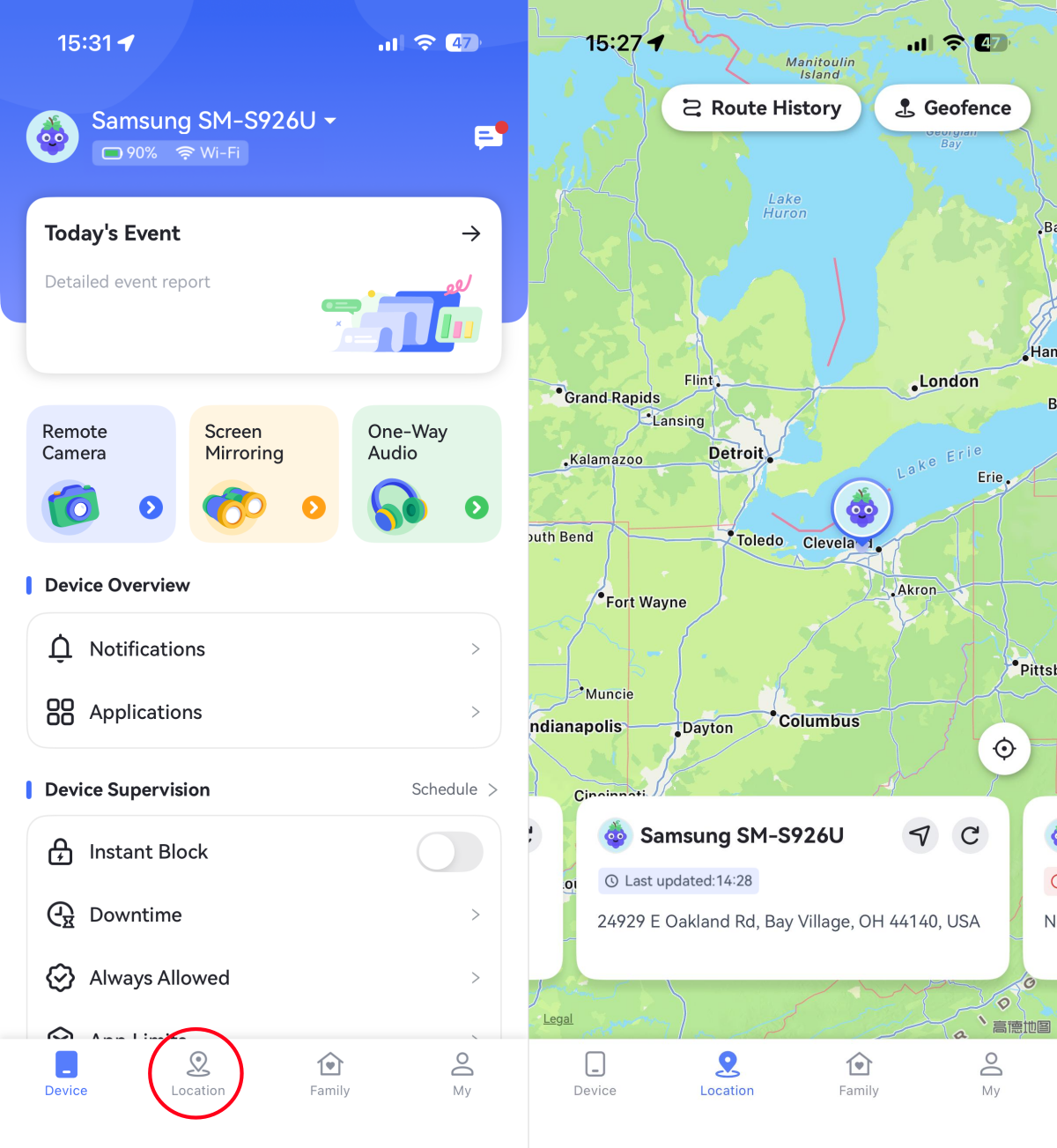
- Step 3.After that, to track your kid's Android phone's location, simply tap the Location icon.
Pros:
- Stable location tracking and up to 30 days location history
- Geofencing and real-time alerts
- SOS/emergency alerts
- Cross-platform tracking between Android and iPhone
- See & hear your child's real-time surroundings & voice for safety checks
Cons:
- Subscription required after 3-day trial
- Requires app installation on child's Android device
2. Google Location Sharing between iPhone and Android
There may be a lot of incompatibility between iPhone and Android, but that should not hinder your tracking experience. Here is how to share location between iPhone and Android with Google Maps so that you can track an Android phone from an iPhone.
On an Android phone (sharing party)
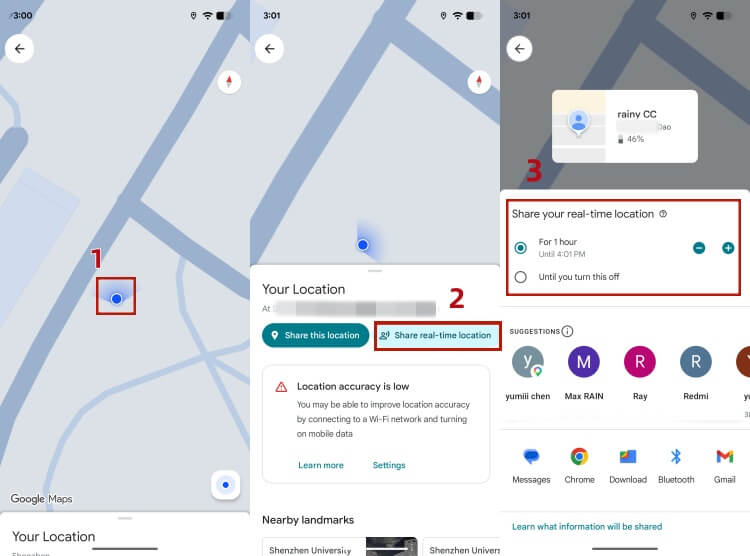
- Step 1.Open the Google Maps app and tap your profile picture in the top right corner.
- Step 2.Select "Share real-time location" and tap "Create Share". (Tip: There's also a "Share this location" option, which is a one-time share.)
- Step 3.Choose the sharing duration: it can be "1 hour" (adjustable) or "Until you turn it off" (permanent sharing).
- Step 4.Select your Gmail address from your contact list, or tap "More" to send via link.
On an iPhone (recipient)
- Step 1.Ensure your iPhone has Google Maps installed and is logged into your Google account.
- Step 2.You'll receive a notification, or you can directly tap your profile picture in Google Maps > Share Location.
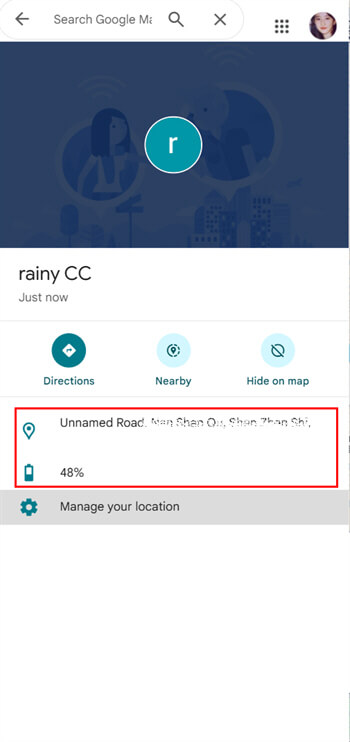
- Step 3.You'll then see the Android phone's real-time icon on the map, and even its remaining battery level.
Pros:
- Free to use
- Cross-platform tracking between Android and iPhone
Cons:
- No location history
- No geofencing or alerts
- Sharing may be disabled at any time and requires active consent
3. Google Find My Device (Find Hub) through Website
Find My Device(Find Hub) is another ideal method of tracking an Android phone through an iPhone device. It offers a free web dashboard, so you don't need to download additional apps on iPhone.
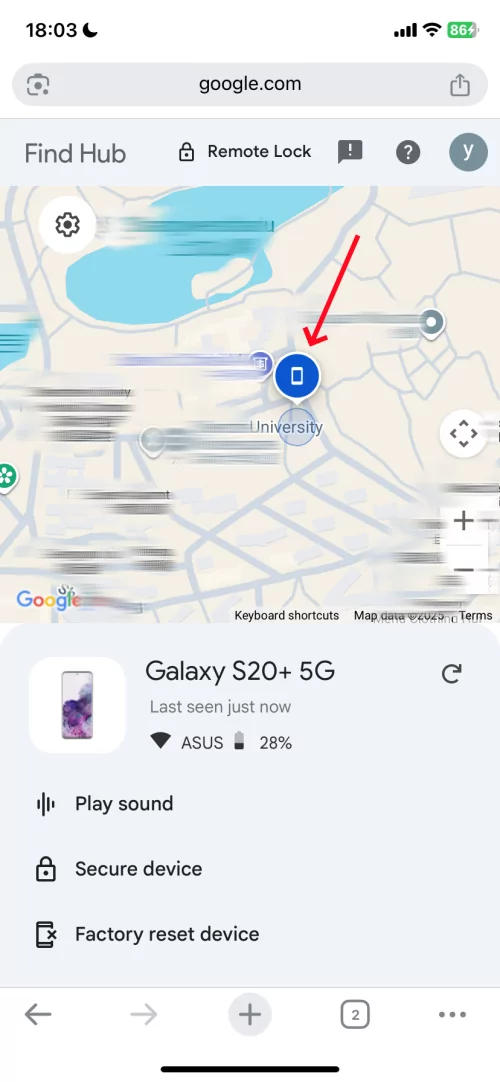
As long as the Android device enabled Google Find My and it is online, iPhone can track every moment of it online. Also, if the two devices are close, you can play a sound to find it nearby. And you can even erase all the content of the Android phone from the iPhone to secure the data.
Here's how to track Android with iPhone with Google Find My:
- Step 1.On the Android phone, ensure the "Find My Device" service is enabled in its settings.
- Step 2.Launch Safari, Chrome, or any other browser on your iPhone and navigate to android.com/find.
- Step 3.Log in using the same Google account that is active on the target Android phone.
- Step 4.Then, select the Android device from the list. Its real-time location will appear on a map.
Pros:
- Free and built-in Android system
- Can remote play sound, lock device and erase data
- iOS device can also access it via the web
Cons:
- Need the password of others' Google accounts
- No location history
- No geofencing or alerts
4. Samsung Find My Mobile(SmartThings Find)
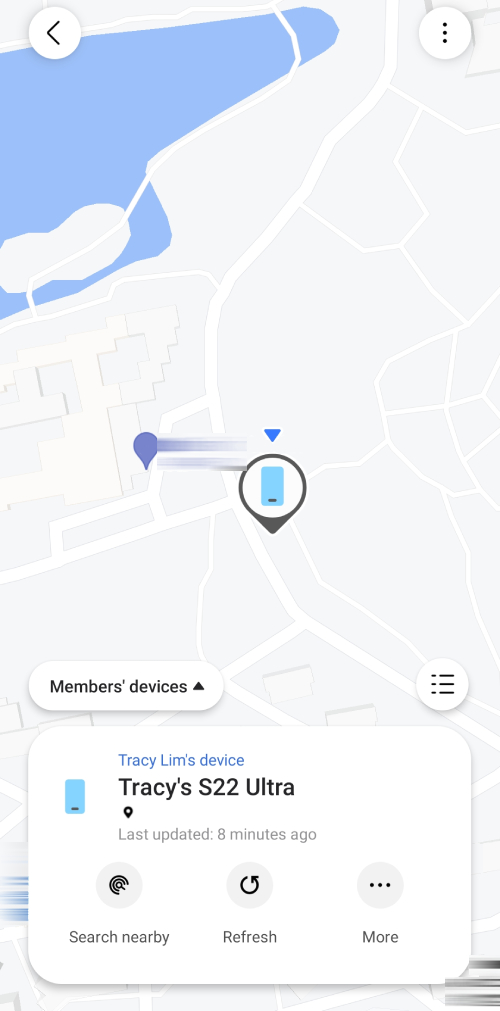
Find My Mobile is a Samsung location sharing service that lets users track the location of their Samsung phones in real-time. Once activated, it makes it possible for users to locate, remotely backup and wipe data on their registered Galaxy mobile devices.
To track a Samsung device on iPhone, please follow:
- Step 1.Make sure the "Find My Mobile" feature is enabled in Samsung's settings.
- Step 2.Open a browser on the iPhone and navigate to Samsung's Find My Mobile website.
- Step 3.Sign in with the Samsung account.
- Step 4.Once the Samsung phone is located, the location will be shown on the Map.
Pros:
- Free & built-in for Samsung devices
- Powerful remote control (lock, unlock, erase, backup)
- Offline finding supported
Cons:
- Only works on Samsung devices
- No location history
- No geofencing or alerts
- Requires pre-enabled settings
5. Family Locator - GPS Tracker
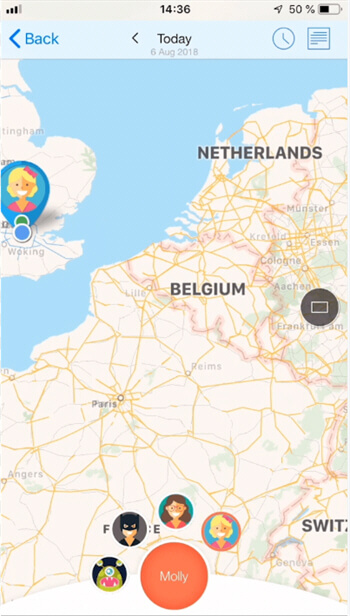
Family Locator is another GPS tracking app that allows users to track Android phones from iOS devices. The app has features like Family Locator that helps users stay connected with all the locations of family members.
Follow these steps to set up the app.
- Step 1.The Family Locator – GPS tracker must be installed on Android and iPhone devices. Launch the Family Locator app on both Android and iOS devices to complete the configuration process.
- Step 2.Share the real-time location with your iPhone device on the Android device.
- Step 3.Open the Family Locator app on your iPhone device and accept the sharing permission. You can also check the app's map to find the location of the target Android device without them knowing.
Pros:
- Real-time location tracking
- Location history available
- Geofencing alerts
- SOS/emergency alerts
Cons:
- Limited features in free version
- Requires app installation on both devices
- Some features need subscription
Conclusion
To track an Android phone from an iPhone, practical options include Google Find My Device, Samsung Find My Mobile, Google Maps location sharing, and third-party location tracking apps. Most of these tools support convenient online location tracking, making it easy to check your child's whereabouts at any time.
However, for parents focused on long-term child safety, we highly recommend dedicated parental control apps such as AirDroid Parental Control. Beyond basic location tracking, it comes with a comprehensive set of features designed for family safety, helping you better safeguard your child's real-world location.
FAQs about Tracking an Android Phone

Here are 8 of the most common signs that someone is tracking on your phone:
1. Strange applications
2. Your device is 'Jailbroken' or 'Rooted'
3. The battery is rapidly depleting
4. Your phone is overheating
5. Absurdly high data use
6. Unusual activity while in standby mode
7. Problems with turning off the phone
8. Strange SMS messages









Leave a Reply.