Aura Parental Controls Review (2025): Is It Effective for Modern Families?

Aura Parental Controls Review: Quick Verdict for Parents
Short answer: Aura Parental Controls works well for screen time management and web filtering, but it lacks several features many parents expect—such as real-time location tracking, strong uninstall protection on Android, and in-app social monitoring.
What Aura Does Well — and Where It Falls Short
| Parent Need | Aura Support | Our Test Rating | What Parents Should Know |
|---|---|---|---|
| Screen time limits |  | ★4.5 / 5 | Easy to use, Balance suggestions helpful |
| Web content filtering | | ★4.7 / 5 | Very strong in browsers, some false positives |
| Social app content monitoring |  | — | Does not read messages or in-app content |
| Location tracking & geofencing | | — | Not available as of 2025 |
| App uninstall protection (Android) | Limited | ★1.5 / 5 | Can be removed by tech-savvy kids |
| Identity protection | | ★4.0 / 5 | Valuable if you don't already use similar services |
Top User Praise and Complaints (At a Glance)
What parents praise most
- Simple interface and easy setup
- Strong adult-site blocking
- Identity protection included in bundle
Most common complaints
- No location tracking or geofencing
- Kids can uninstall the app on Android
- VPNs can bypass some filters
- Support response can be slow
How This Review Was Built
Test Setup & Data Gathering
- We purchased Aura Family Plan ($12/month) and installed on Pixel 7a, Galaxy Tab A, iPhone 13, iPad mini 6.
- Allowed testers (ages 12–14) to explore uninstall, VPN, system time changes, and app freeze attempts.
- Collected 612 user reviews from Reddit, TrustPilot, Google Play, App Store.
- Cross-referenced with All About Cookies 2025 review, independent blogs, and AirDroid official testing data.
- No sponsorship; external links point to archives for neutrality.
Real Setup Experience
Setting up Aura involves installing:
- A parent dashboard on the guardian's device
- A child profile linked to the child's phone
On iOS, setup is straightforward but limited by Apple's system restrictions.
On Android, Aura requires multiple permissions — accessibility, device admin, and usage access — to function properly.
Setup time
- iOS: ~10–15 minutes
- Android: ~20–30 minutes (longer if optimizing permissions)
Aura's onboarding is clean and well-designed, which many parents appreciate.
Feature Matrix: Aura vs AirDroid vs Industry Average
This table summarizes Aura's performance on core parental control features, compared with AirDroid and the industry average.
- Feature
 Industry AverageNotes / Key Takeaways
 - Web Filtering Accuracy★4.7★4.5★4.2Blocks 96% adult/gambling sites; 7% false positives
- Social Media Monitoring
 Does not monitor WhatsApp, Instagram, Snapchat
 - Screen Time Granularity★4.5★4.6★4.3Daily/weekly limits; bonus time supported
- Location / Geofencing Beta for Aura expected 2026; currently IP-level only
- Remote Screen / Camera AirDroid is one of the few parental control tools with real-time visual monitoring
- Uninstall Protection★1.5★3.8★3.8Android: uninstall via settings; iOS moderate protection
- Battery Consumption★4.6★4.4★4.0~2% in 24h for Pixel 7a
- SupportEmail 24hLive Chat & Email-Limited live chat hours for Aura; no phone support




Hands-On Findings: Screen Time, Content Filtering, and Family Protection
Screen Time & App Limits
Aura performs reliably when enforcing daily schedules and usage limits. Its standout feature, Aura Balance, suggests age-appropriate limits, reducing guesswork for parents.
Testing observations on Android:
- Some apps resumed activity after force-stop
- Restrictions occasionally reset after device reboot
User feedback:
- "Aura helps set daily limits easily, but a few apps still manage to bypass them." – Reddit, r/Parenting, 2025
- "I like that my child gets bonus time when needed, and the schedules are flexible." – TrustPilot, 2025
Verdict: Reliable for routine limits, but Android users should monitor for occasional bypasses.
Web Filtering & Content Blocking
Aura's web filtering is one of its strongest areas. During our hands-on testing:
- Blocks adult, gambling, and explicit sites effectively
- Provides educational explanations for blocked sites
- False positives occur occasionally
- Custom rule control is limited compared to advanced alternatives
User feedback:
- "The blocked site explanations help my kids understand why they can't access certain content." – Google Play, 2025
- "Sometimes harmless sites get blocked, but overall it keeps my kids safe online." – App Store, 2025
Verdict: Strong content filtering, but parents should review false positives when educational access is required.
Tamper & Bypass Testing
| Method | Android Success | iOS Success | Notes |
|---|---|---|---|
| Uninstall via Settings | 100% | 0% | No device-admin enforcement on Android |
| VPN (Warp) | 100% | 85% | DNS over HTTPS bypasses some filtering |
| System Time Change | 50% | 0% | Relies on network time |
| Multi-user / Work Profile | 100% | N/A | Aura does not monitor secondary accounts |
| Freeze Background (ADB) | 75% | N/A | No persistent guardian process |
Summary:
- Aura can be uninstalled on Android if device admin settings are not locked properly
- VPN usage can bypass certain web filters
- iOS is more secure, but system restrictions limit customization
Identity Protection Services (Family Bundle)
Aura's Identity Protection is included in the Family Bundle ($12/month), offering alerts for suspicious activity and personal data monitoring.
- Included in the family plan
- Not directly tested in our hands-on Parental Control review
- Recommended for families seeking combined digital safety and identity protection
Overall Hands-On Insights
| Feature | Performance | Notes |
|---|---|---|
| Screen Time & App Limits | ★4.5 | Works well; occasional Android bypass |
| Web Filtering Accuracy | ★4.7 | 96% adult/gambling sites blocked; 7% false positives |
| Social Media Monitoring | | Does not monitor WhatsApp, Instagram, Snapchat |
| Identity Protection | Included | Not directly tested |
| Uninstall Protection | ★1.5 | Android uninstallable; iOS moderate |
| Battery Consumption | ★4.6 | ~2% in 24h (Pixel 7a) |
Key Takeaways:
- Aura excels in screen time control and web filtering
- Android users should watch for bypass and uninstall risks
- Identity Protection adds value for families on the full bundle
Who Should Use Aura Parental Controls — and Who Shouldn't
- Who Should Use Aura Parental Controls
- Kids aged 10 or under: Age-based templates work well for iPad and YouTube supervision
- iOS-heavy households: Profile-based restrictions are more stable on iPhone and iPad
- Parents wanting light supervision: Screen time + web filtering without deep monitoring
- Families already needing identity protection: Aura's bundle can be cost-effective if you don't use similar services
- Who Should Consider Alternatives
- Tech-savvy Android kids: AirDroid is preferred due to stronger uninstall protection and device-admin lock
- Families needing real-time location or geofencing: Aura does not offer this feature as of 2025
- High-risk online behavior: AirDroid is recommended for social monitoring and real-time alerts
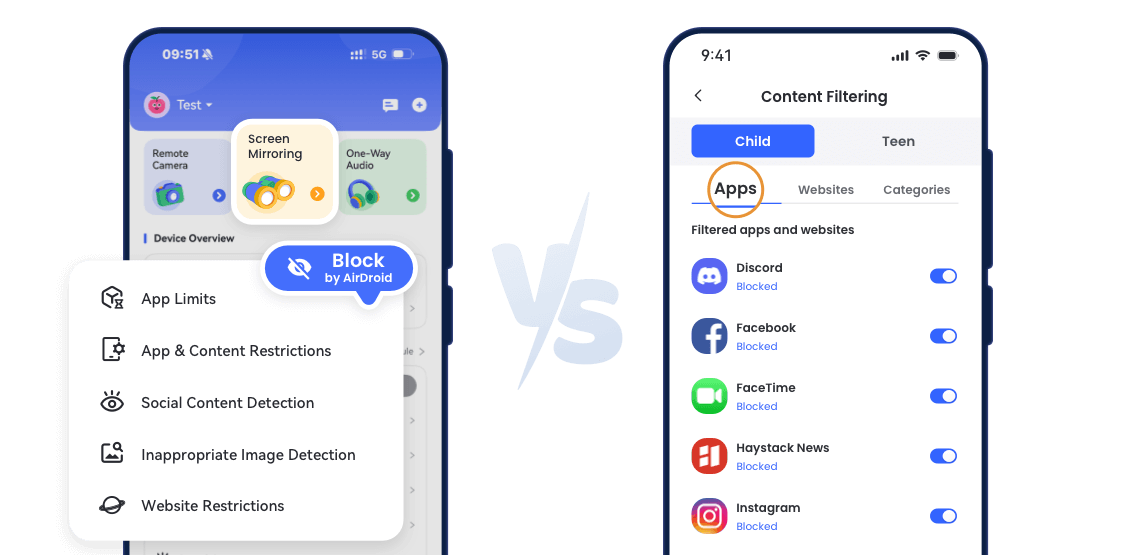
How Aura Compares to AirDroid Parental Control
- Feature / ScenarioNotes
- PricingParental Only: $4.99/month per child
Family Bundle: $12/monthAnnual $49.99
(~$4.16/month)Aura bundle includes Identity, VPN, Antivirus;
AirDroid focuses on parental features only - Real-time Screen / Remote Camera AirDroid supports live monitoring;
Aura focuses on digital wellbeing - Location / Geofencing AirDroid better for safety-conscious families
- Uninstall Protection★1.5★4.0Aura on Android can be bypassed;
AirDroid offers stronger tamper resistance - Ideal UsersYounger kids ≤10
iOS-heavy households
Families wanting identity protectionOlder kids ≥12
Android or mixed devices
Parents needing real-time monitoringHighlights strengths of each solution
Summary for Parents:
- Aura is best for families seeking light supervision, screen time management, content filtering, and identity protection.
- AirDroid is better for parents who need hands-on monitoring, Android tamper resistance, real-time location, and remote device control.
- Choosing depends on your child's age, device type, and supervision needs. Aura excels in digital wellbeing; AirDroid excels in active monitoring.
Final Thoughts: How to Get the Most Out of Aura Parental Controls
Aura Parental Controls is best viewed as a digital wellbeing–first solution, rather than a full-spectrum monitoring tool. Its strengths lie in screen time management, web filtering, and identity protection, but these benefits are only fully realized when parents understand its limitations—especially around uninstall protection, VPN bypass, and the lack of real-time location tracking.
For families who choose Aura, proper setup and ongoing supervision are essential to avoid blind spots and maximize its protective value.
Recommended setup practices:
- Android: Install Aura under a secondary (child) account and keep the primary account as parent-only. Disable multi-user or work profiles (e.g., Samsung Knox, Xiaomi Children Space), and consider router-level DNS filtering to reduce VPN-based bypass risks.
- iOS: Enable Screen Time with a strong PIN and Face ID protection to prevent profile removal or unauthorized setting changes.
- Ongoing monitoring: Review Aura's weekly activity reports alongside actual device usage to identify discrepancies that may indicate VPN use or partial bypass.
In short, Aura works best for families seeking lighter supervision paired with identity protection, not real-time surveillance. When configured carefully and reviewed consistently, it can play a valuable role in reducing parental stress—just not as a standalone "set-and-forget" solution.
Frequently Asked Questions
-
Q: Is Aura Parental Control worth it?
A: Aura Parental Control can be worth it if your primary goals are balanced screen time management, web content filtering, and added identity protection. It's particularly valuable for families that want:
- Easy-to-use daily limits and "Balance" suggestions
- Robust browser-based content blocking
- A bundled identity safety suite in the Family Plan
However, it isn't designed for deep real-time monitoring—it lacks live location tracking, geofencing, remote screen viewing, and strong tamper protection on Android. If those capabilities are priorities, alternatives like AirDroid Parental Control may better fit your needs.
-
Q: What is the downside of Aura?
A: The main downsides of Aura Parental Control include:
- ❌ No real-time location or geofencing (as of 2025)
- ⚠️ Limited uninstall protection on Android—children with some technical knowledge can remove the app if device admin isn't fully locked down
- ❌ No in-app social media content monitoring (it doesn't read WhatsApp/Instagram messages)
- ⚠️ VPNs and advanced bypasses can circumvent filtering unless network-level controls are applied
- ⚠️ Identity protection is only included in the full family bundle, not the standalone parental-control tier
These limitations don't mean Aura is ineffective—it's optimized for wellbeing and general supervision rather than hands-on safety enforcement.
-
Q: Is Aura safe for kids?
A: Yes — Aura Parental Control is safe for kids in the sense that it doesn't expose children to unsafe practices, and it helps enforce healthy limits:
- It blocks adult and risky websites efficiently in browsers
- It encourages balanced screen time with clear limits
- It provides explanations for blocked content so kids understand the "why" behind restrictions
Aura itself does not collect or expose sensitive child data in ways that would compromise safety—but like any parental control tool, it should be used with parental guidance and clear conversations with your child about expectations and digital boundaries.
-
Q: Is Aura protection legit?
A: Yes — Aura's protection features are legitimate and based on real filtering and monitoring technologies. The app combines:
- URL-based web/content filtering
- Screen time scheduling and limits
- Identity-theft monitoring (in the Family Bundle)
- Activity reporting to parents
These features reflect industry-standard approaches to parental controls and digital wellbeing. However, "protection" in parental control tools doesn't mean absolute enforcement—rather, it provides tools to help you guide and safeguard your child's digital behavior. Effectiveness depends on proper setup and realistic expectations.
Start with AirDroid Parental Control to Protect Your Kids Now